VR Example
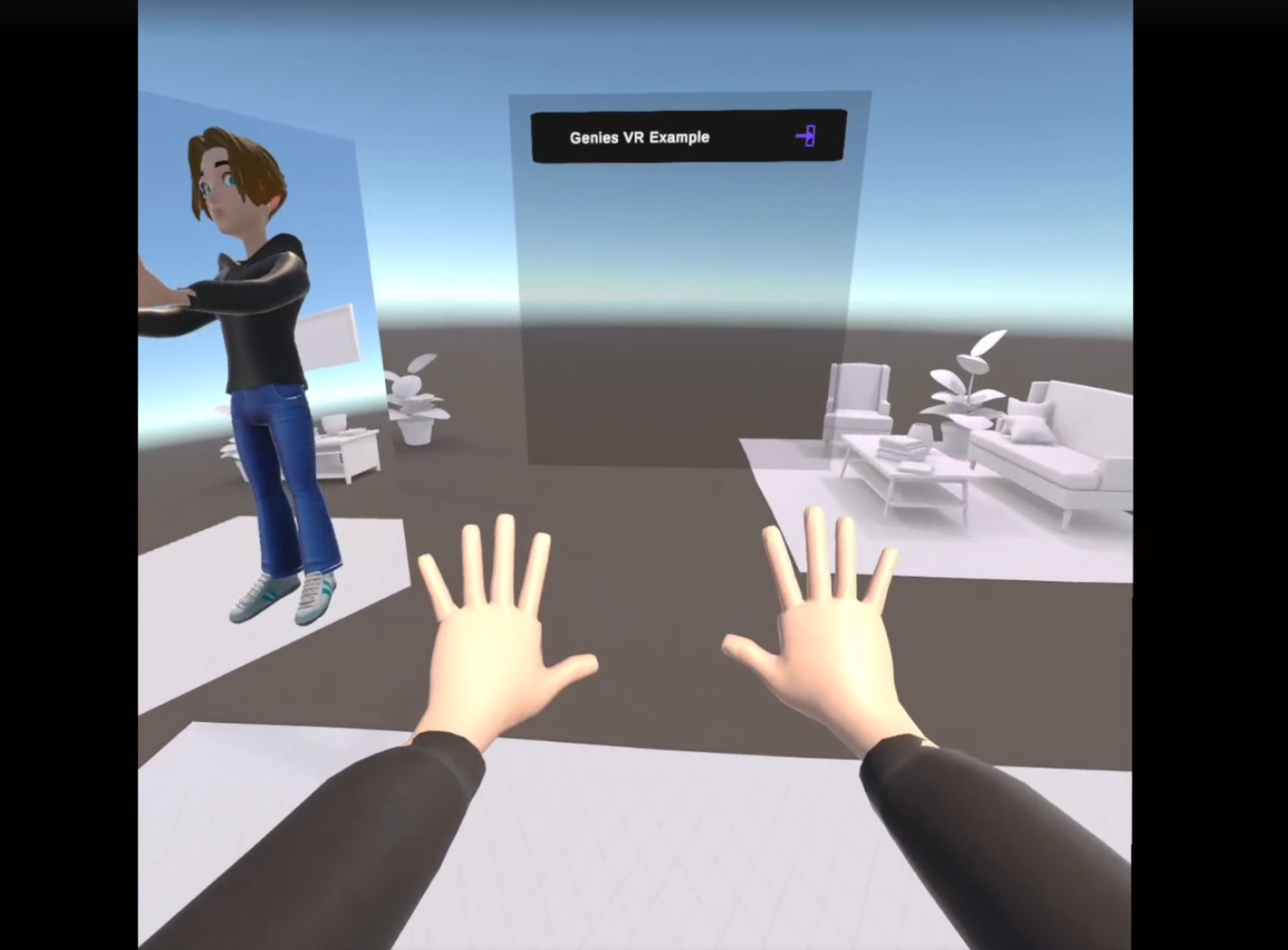
This example project demonstrates the integration of the Genies Avatar SDK with Meta's SDK. The project will be buildable to Meta Quest 3.
Key Unlocks
- Leverages Genies login flow with UI configured to work in VR.
- Features pre-configured character retargeting, set up to work especially for Genies Avatars.
- Hides face and head geometry from the VR camera to prevent clipping artifacts.
- Works with hand tracking as well as controllers.
A VR-friendly avatar editor is not included in this example project. A developer should be able to adapt the Avatar Editor framework from the Genies SDK, if needed.
Link to Project
The VR Example project is available on GitHub:
https://github.com/geniesinc/genies-sdk-vr-example
Requirements
- Unity 2022.3.62f2 or later (including Unity 6)
- Android build support installed via Unity Hub
- Git installed and accessible to Unity/UPM
- Required to fetch the Meta Movement SDK Git dependency
- Network access on first open (some packages restore from GitHub)
Packages Included
- Unity packages (remote UPM dependencies, auto-downloaded; not redistributed):
- URP (
com.unity.render-pipelines.universal) - OpenXR (
com.unity.xr.openxr) - XR Management (
com.unity.xr.management)
- URP (
- Meta XR SDKs (remote UPM dependencies, auto-downloaded; not redistributed):
- Core (
com.meta.xr.sdk.core) 83.0.1 - Interaction (
com.meta.xr.sdk.interaction.ovr) 83.0.1 - Movement (
com.meta.xr.sdk.movement, UPM Git dependency)
- Core (
- Genies Avatar SDK (vendored UPM package; redistributed):
- Core (
Packages/com.genies.avatar-sdk.client/) 2.0.1
- Core (
Getting Started
- Open the project in Unity 2022.3.62f2 or later (including Unity 6).
- Wait for packages to resolve.
- If you're on a fresh clone, Unity will need to fetch
com.meta.xr.sdk.movementfrom GitHub (requires Git).
- If you're on a fresh clone, Unity will need to fetch
- If you haven't done so already, create a Genies account
- Customize an Avatar in the Avatar Starter sample scene
- Use the Bootstrap Wizard to configure the Genies Avatar SDK for an Android build.
Scenes
Assets/Scenes/Main.unity: Core scene for testing. Use the UI to login, and wait for your Genie to spawn.Assets/Scenes/StagingAndConfiguration.unity: Useful for authoring and testing Avatar retargeting.Assets/Samples/Genies Avatar SDK/1.3.1/Avatar Starter Scene/Scene/AvatarStarter.unity: Non-VR scene from the Genies SDK, Useful for creating a Genie account and customizing an Avatar.
High Level Flow
Assets/Genies VR Example/LoginCanvasVR.cs: initializes the Genies SDK and drives email-OTP login with a VR-friendly UI.Assets/Genies VR Example/LoadAndBecomeMyAvatar.cs: loads the logged-in user's Avatar.Assets/Genies VR Example/GeniesAvatarControllerVR.cs: hooks the loaded Avatar into Meta retargeting and applies VR-specific rendering tweaks (including head/face hiding).Assets/Genies VR Example/GeniesCharacterRetargeterForMeta.cs: name-based bone mapping and retarget setup for Genies Avatars.
Building to Meta Quest 3
This repo is intended to be buildable to Quest 3.
To build to Quest 3, follow the guidelines from the Meta Quest documentation: https://developers.meta.com/horizon/documentation/unity/unity-build/
Steps to Build
Switch Build Platforms
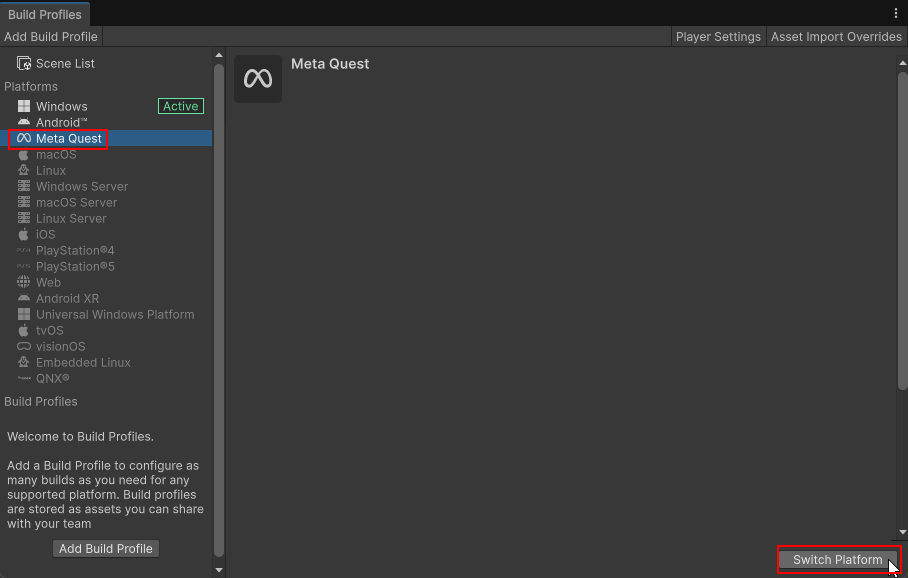
Open the Build Settings window. Download the necessary modules for Meta Quest platform and click the Switch Platform button at the bottom.
Open Meta Quest Settings
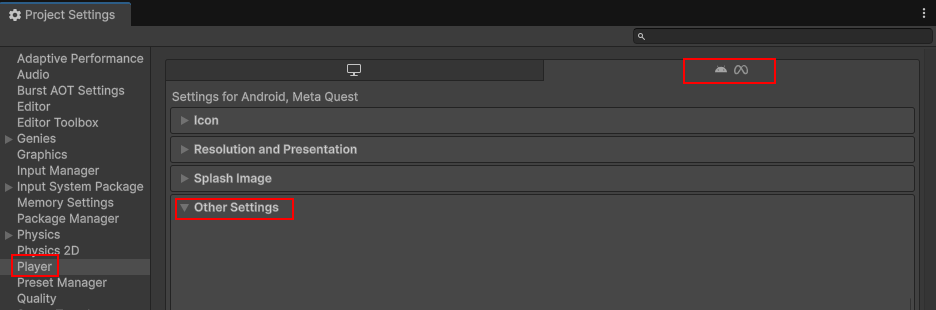
Then open the Project Settings window. Then select the Player option in the left side menu. Open the Settings for Android, Meta Quest tab.
Set the Entry Point
Find the Application Entry Point setting and set it to Activity.

Notes
- Some Avatar scaling and stabilization behaviors are device-only (Editor vs on-device behavior can differ).
- If VS Code search seems to "miss" Unity assets, check
.vscode/settings.jsonworkspace excludes.
Third-party Code Redistribution
This repository does not redistribute any of the Meta XR SDK packages themselves. Core, Interaction, and Movement are remote dependencies that Unity's Package Manager will auto-download when you open the project.
The one Package Manager dependency that is redistributed is the Genies Avatar SDK package, which is directly included under Packages/com.genies.avatar-sdk.client/.
It does include and redistribute various Meta XR Samples, sourced from:
- Meta XR Core SDK
- Meta XR Interaction SDK
- Meta XR Movement SDK
Licenses
- Review the applicable third-party licenses and notices included with the Meta packages and any bundled sample content.
- The Genies Avatar SDK package also contains third-party notices under
Packages/com.genies.avatar-sdk.client/Internal/**/ThirdPartyNotices. - The Genies Avatar SDK is governed by its own EULA license agreement.