Ready Player Me
Ready Player Me (RPM) offered a solution to integrate their Avatar technology for your Unity projects. Genies provides the perfect alternative to RPM avatars. This page will provide a technical transition from RPM to Genies.
RPM shut down its services on January 31, 2026. Check out the Genies blog post to get more details on the shutdown.
Key Similarities
Genies and RPM have a lot of similarities. Here are the top-level shared functionalities:
- Unity SDK to load an avatar 3D model that is rigged and ready to be used.
- Avatar editor that can be integrated into your project and customized.
- Developer portal that manages API keys and can upload custom wearable asset.
- Has support for XR/VR projects.
Key Differences
Here are some key differences when switching from RPM to Genies:
- RPM uses a server-generated GLB file to deliver their avatars, while Genies avatars are composed locally using a custom model format.
- RPM stores the GLB files on their servers and delivers them using a URL. Genies stores a user's avatar definition on their server which can be retrieved using the user's credentials and used locally to generate the user's avatar.
- Genies offers more avatar customization than RPM such as full body tattoos, dynamic hair animations, facial animations, color wheel customization, and facial/body shape sliders for finer-grained control.
An avatar definition is a list of all the body, facial, and wearables attributes to create the avatar. It is used to locally compose a Genies avatar.
Login Flow
The Genies Avatar SDK has a similar login system to RPM. The Genies account allows users to save a global Avatar definition that is interoperable. A developer can also choose to use the anonymous login flow to allow users to not need a Genies account.
Check out the User Login page for more information.
Loading a User's Avatar
Since Genies avatars are composed locally, this reduces server dependencies and allows more runtime customization. Genies servers are managing the user's avatar definition. Genies developers can also create and use locally-stored avatar definitions for player templates or NPCs.
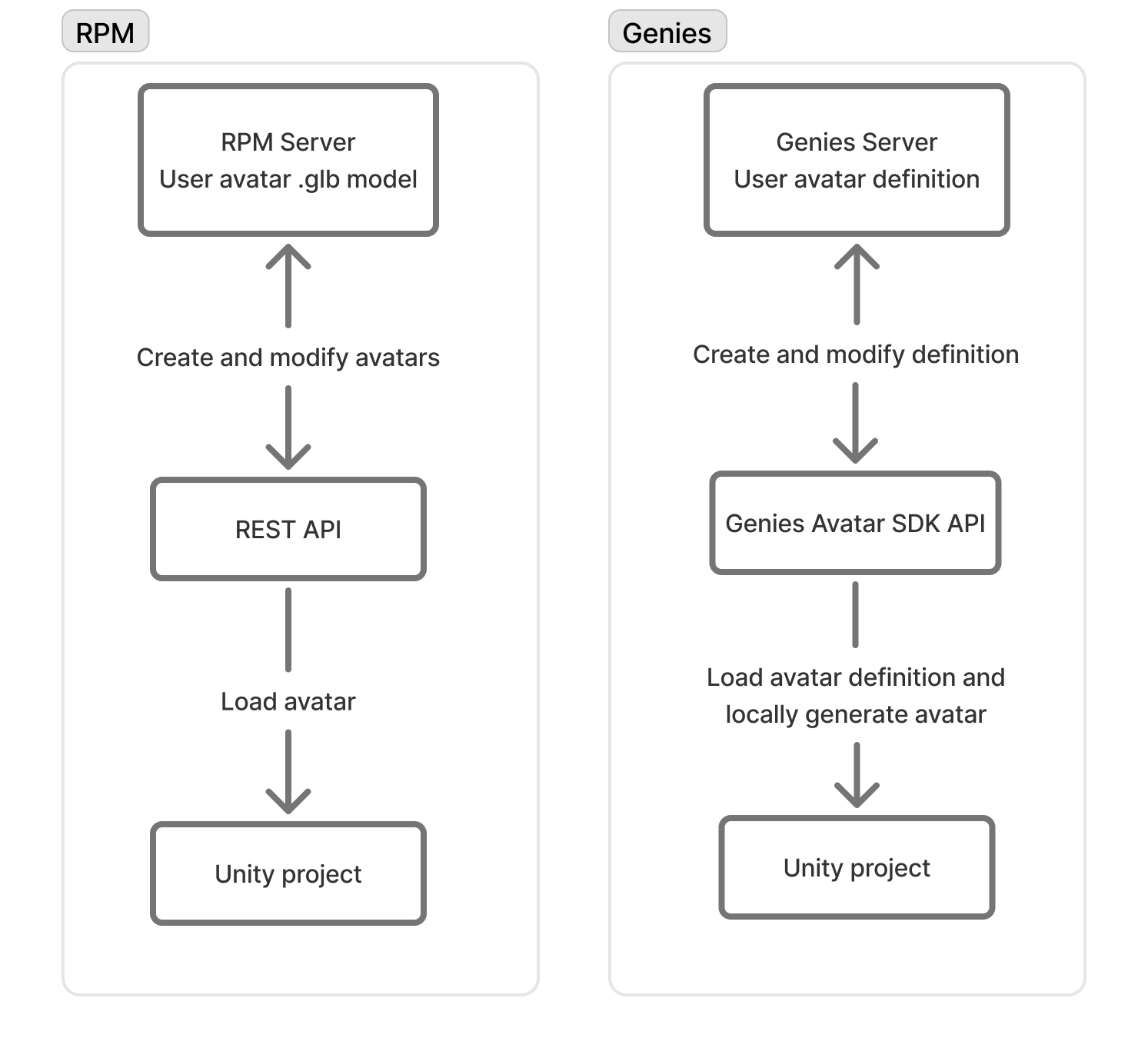
Check out the Load an Avatar page for more information.
Avatar Editor
RPM offered a sample scene that showed how to integrate the Avatar Creator into a Unity project using their API. Genies has a similar framework named the Avatar Editor that is built-in and ready to use. It can be opened and closed using the API and can save changes to a user's avatar definition or a local avatar definition.
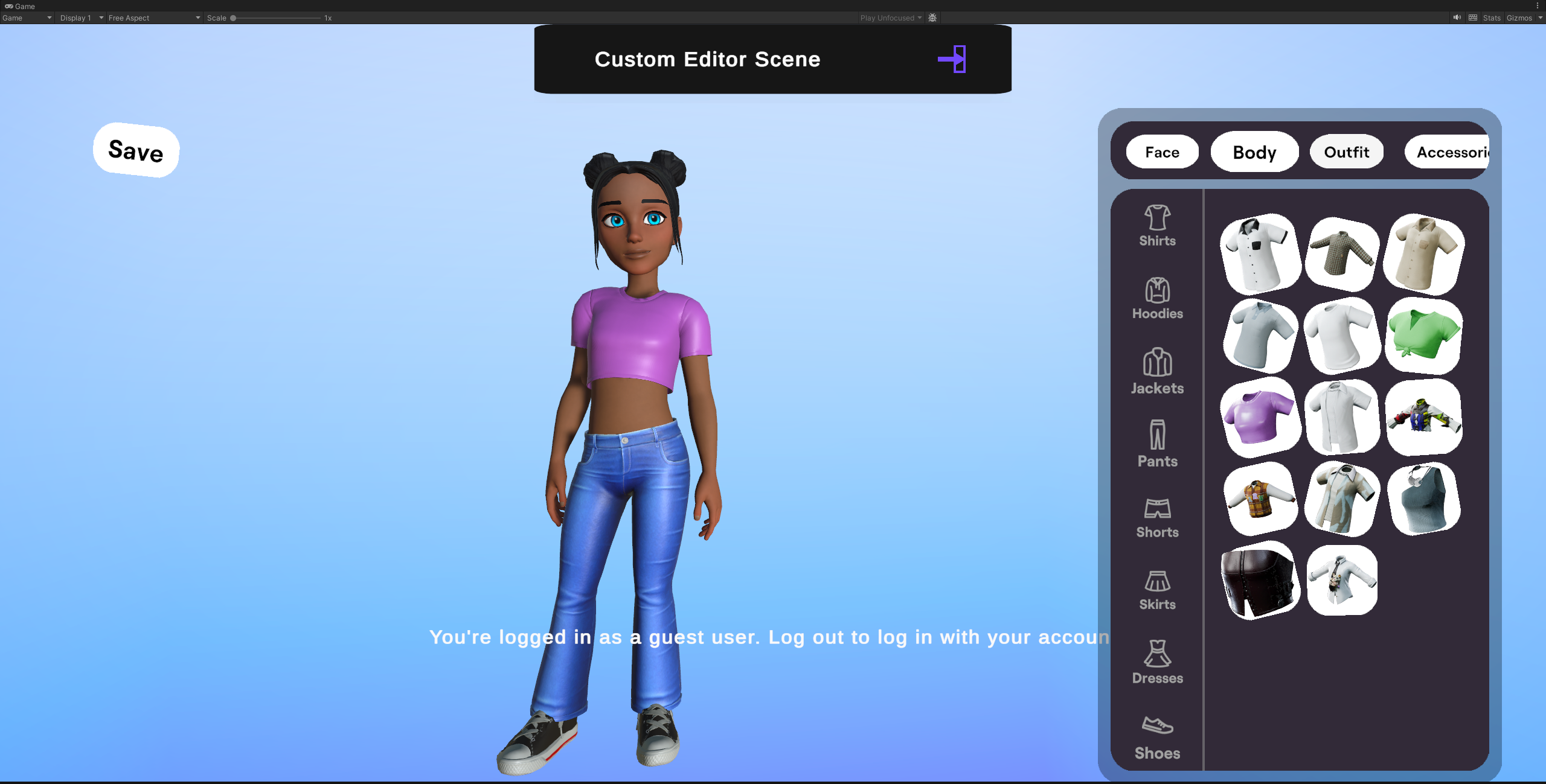
Check out the Avatar Editor page for more information.
API Methods
One of the other key differences between Genies and RPM is the API methods. RPM used events to trigger delayed methods such as when an avatar completed loading. Genies uses UniTask API methods to wait for the logic to return.
See this comparison of a RPM script and a Genies script that both load a user's avatar:
- Ready Player Me
- Genies
using ReadyPlayerMe.Core;
using UnityEngine;

public class RPMAvatarLoadingExample : MonoBehaviour
{
    private string avatarUrl = "https://models.readyplayer.me/638df693d72bffc6fa17943c.glb";

    private void Start()
    {
        var avatarLoader = new AvatarObjectLoader();

        //Use the OnCompleted event to set the avatar and setup animator
        avatarLoader.OnCompleted += (_, args) =>
        {
            avatar = args.Avatar;
            AvatarAnimationHelper.SetupAnimator(args.Metadata, args.Avatar);
        };

        //Load the avatar given the URL
        avatarLoader.LoadAvatar(avatarUrl);
    }
}
using Genies.Sdk;
using UnityEngine;

public class GeniesAvatarLoadingExample : MonoBehaviour
{
    private string avatarName = "MyAvatar";
    private Transform parentTransform = null;
    private RuntimeAnimatorController animatorController = null;

    private async void Start()
    {
        //Try to login to Genies account with instant login option
        var result = await AvatarSdk.TryInstantLoginAsync();
        if (result.isLoggedIn)
        {
            //Once logged in, load the user's avatar
            ManagedAvatar userAvatar = await AvatarSdk.LoadUserAvatarAsync(avatarName, parentTransform, animatorController);
        }
    }
}
Checkout the API Reference page for more information.