Prerequisites
The Genies Avatar SDK requires a minimum operating system and Unity version.
Check Operating System
The Genies Avatar SDK requires developers to use a minimum operating system spec:
- Windows 10+
- macOS 15+ (M-series)
Using the Genies Avatar SDK with Linux or Mac (Intel) platforms is not supported.
Download Unity Hub
Unity Hub is the software tool to create and launch Unity projects and choose which version of Unity to use for the project.
Start by downloading Unity Hub.
Download Unity Version
The Genies Avatar SDK works with a minimum Unity version of 2022.3.62f2.
Here are the two recommended versions:
Install Build Modules
Once you download Unity Hub and the correct Unity version, open Unity Hub.
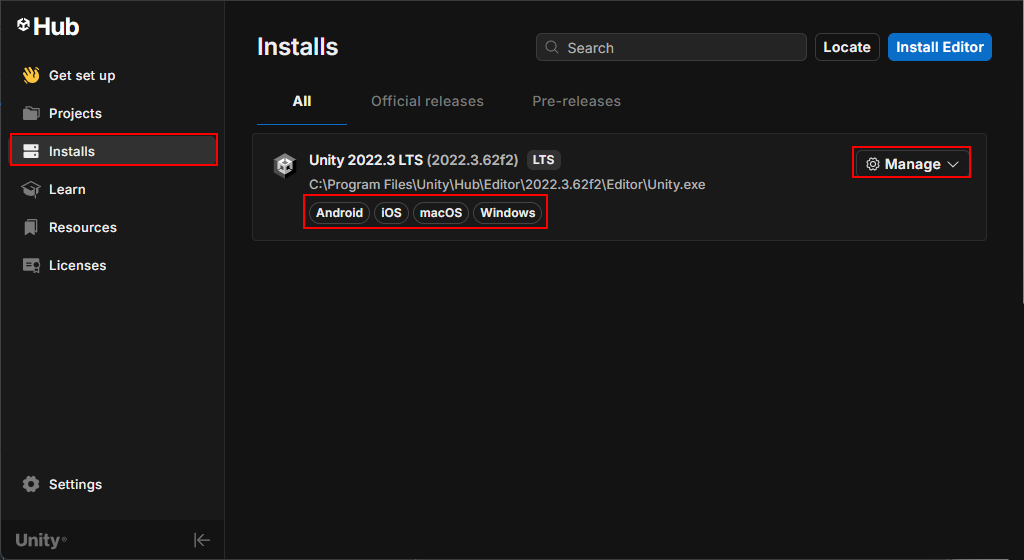
Click the Installs tab on the left side. Next to the appropriate version, click the Manage button to the right of it. Select the Add modules option.
Add any build modules necessary for your target builds such as:
- Android Build Support
- iOS Build Support
- Mac Build Support
- Windows Build Support
Click Continue and after installation, the Unity Hub should display the modules below the Unity version.