Legacy Avatar Editor
The Genies Avatar SDK has a legacy Avatar Editor framework which allows developers to display a functioning UI for users to change their Avatar looks and wearables.
Check out the Custom Avatar Editor page for the framework that replaced the legacy Avatar Editor.
This was originally included in the Genies Avatar SDK core package but has been removed starting in v3.8.4 to eliminate dependencies with Cinemachine and specific input systems.
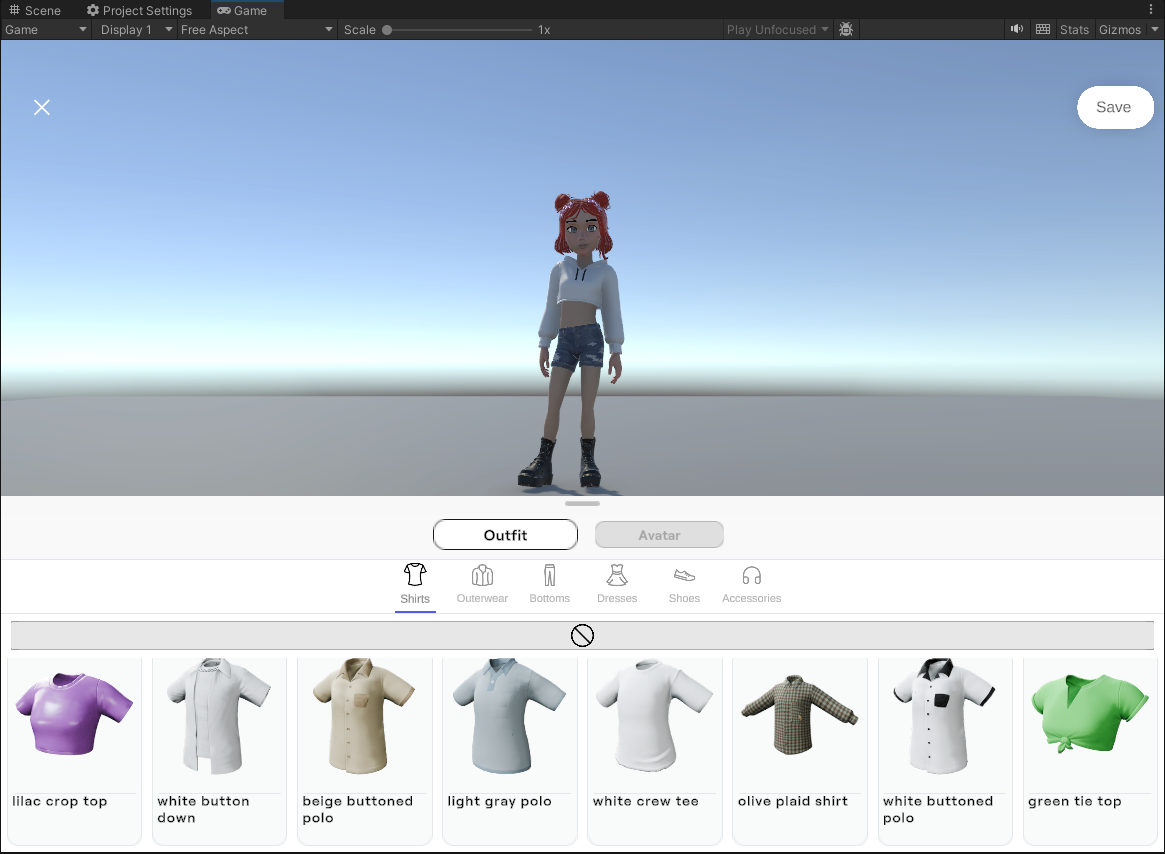
Key Unlocks
- Displays a functional UI optimized for mobile devices for users to edit their Avatars
- Contains APIs for developers to open, close, and set the saving functionality.
Link to Project
The legacy Avatar Editor package is available on GitHub:
https://github.com/geniesinc/com.genies.avatareditor-sdk.client
Requirements
- Unity v2022.3.32f1 or later (including Unity 6).
- Genies Avatar SDK v3.8.4 or later.
Getting Started
- Open the GitHub repository for the legacy Avatar Editor.
- Copy either the HTTPS or SSH Git URL shown on the repository page.
- In Unity, open Window > Package Manager.
- Click the + button in the top-left corner and select Add package from Git URL….
- Paste the Git URL and click Add to install the package.
You can install the package using either type of Git URL:
- HTTPS (recommended): Works immediately with no additional setup and is best for most users.
https://github.com/geniesinc/com.genies.avatareditor-sdk.client.git#v7.1.9
- SSH: Requires a GitHub SSH key configured on your machine. Use this option if you already access GitHub repositories via SSH.
git@github.com:geniesinc/com.genies.avatareditor-sdk.client.git#v7.1.9
Legacy Avatar Editor API
Genies Sdk Avatar Library
using Genies.Sdk;
The Genies.Sdk library contains methods to open or close the Avatar editor.
Avatar Editor Events
AvatarSdk.Events.AvatarEditorOpened;
AvatarSdk.Events.AvatarEditorClosed;
These events will fire when the Avatar editor is opened or closed.
Is Avatar Editor Open Boolean
AvatarSdk.IsAvatarEditorOpen;
This boolean checks if the Avatar Editor is open.
Close Avatar Editor Async Function
AvatarSdk.CloseAvatarEditorAsync(bool);
This function will close the Avatar editor. It will reset the camera back to its original location when the Avatar editor was opened. It also will revert the Avatar back to its original definition if flagged.
Open Avatar Editor Async Function
AvatarSdk.OpenAvatarEditorAsync(ManagedAvatar, [Camera]);
This function will open the Avatar editor. It requires a ManagedAvatar parameter to know which Avatar will be edited. It also has an optional Camera parameter to transition to the ideal view of the Avatar. If the camera parameter is not passed, it will default to the main camera in the scene.
Set Editor Save Locally and Continue Async Function
AvatarSdk.SetEditorSaveLocallyAndContinueAsync(string);
This function will set the Save button to save the Avatar definition to a local storage given a profile ID string. Clicking the Save button will let the user continue to use the editor.
Set Editor Save Locally and Exit Async Function
AvatarSdk.SetEditorSaveLocallyAndExitAsync(string);
This function will set the Save button to save the Avatar definition to a local storage given a profile ID string. Clicking the Save button will close the editor.
Set Editor Save Remotely and Continue Async Function
AvatarSdk.SetEditorSaveRemotelyAndContinueAsync();
This function will set the Save button to save the Avatar definition as the global Avatar definition. Clicking the Save button will let the user continue to use the editor.
Set Editor Save Remotely and Exit Async Function
AvatarSdk.SetEditorSaveRemotelyAndExitAsync();
This function will set the Save button to save the Avatar definition as the global Avatar definition. Clicking the Save button will close the editor.
Example
Open the Avatar Editor
This example will setup two buttons to open and close the Avatar editor.
using Genies.Sdk;
using UnityEngine;
using UnityEngine.UI;

public class AvatarEditorTest : MonoBehaviour
{
    [SerializeField] private ManagedAvatar userAvatar;
    [SerializeField] private Button openAvatarEditorButton;
    [SerializeField] private Button closeAvatarEditorButton;

    private void Start()
    {
        openAvatarEditorButton.onClick.AddListener(OpenAvatarEditor);
        closeAvatarEditorButton.onClick.AddListener(CloseAvatarEditor);
    }

    private void OnDestroy()
    {
        openAvatarEditorButton.onClick.RemoveListener(OpenAvatarEditor);
        closeAvatarEditorButton.onClick.RemoveListener(CloseAvatarEditor);
    }

    async void OpenAvatarEditor()
    {
        if(AvatarSdk.IsAvatarEditorOpen) {
            Debug.Log("Error: Avatar Editor Already Opened!");
        }else{
            Debug.Log("Opening Avatar Editor...");
            await AvatarSdk.OpenAvatarEditorAsync(userAvatar);
            Debug.Log("Avatar Editor Opened!");
        }
    }

    async void CloseAvatarEditor()
    {
        if(AvatarSdk.IsAvatarEditorOpen) {
            Debug.Log("Closing Avatar Editor...");
            await AvatarSdk.CloseAvatarEditorAsync();
            Debug.Log("Avatar Editor Closed!");
        }else{
            Debug.Log("Error: Avatar Editor Already Closed!");
        }
    }
}
This example assumes the user is logged in before either button is pressed.