Prerequisites
Download and Install Maya
Download the latest version of Autodesk Maya HERE. It is compatible with Windows, Apple and Linux platforms.
Set Up Autodesk Maya Scene
Step 1. Download Genies Starter Pack Assets
Starter files:
- Mannequin and Layering Guides: genies_mannequin_guides.fbx
- Fashion Kit: genies_fashionKit.fbx
Step 2. Import Starter Pack Assets
After the launch, Maya will automatically create a New Scene for you.
Please bring in (Import) the provided starter files to the new scene. To do so, please proceed to File - Import Option Box and select the downloaded .fbx files.
*You can also drag and drop the .fbx files from your downloaded folder to the middle of the scene.

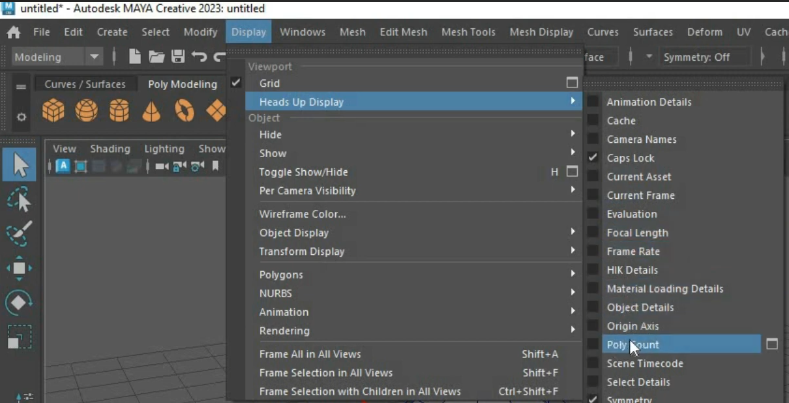
Step 3. Display Polycount
Polycount is a very important aspect of modeling for mobile and AR experiences. Having the polycount displayed while you are working gives you a good understanding on how much detail you can add to your model.
Select Display > Heads Up Display > Poly Count. The Heads Up Display appears in the upper left corner of the view. Total counts for all visible polygons.